Blog
AIWriteBook Review: Can an All-in-One AI Studio Actually Publish Amazon KDP Books?

Affiliate Disclosure: This post contains affiliate links. If you purchase through [Enter Your Affiliate Link], I may earn a small commission at no additional cost to you. Please note that this review is based on extensive technical research, official feature documentation, public developer roadmap logs, and verified user data rather than personal hands-on testing.
Writing a full-length book has historically demanded a frustrating, fragmented tech stack. You draft in Scrivener or Google Docs, hire a designer on Fiverr for cover art, struggle with Vellum or Calibre to format margins and gutters, and then fumble through Amazon KDP’s metadata fields hoping your files pass inspection. If you try to speed up the process with standalone AI tools like ChatGPT or Claude, you quickly face generic phrasing, hallucinated continuity errors, and forgotten character traits by Chapter 4.
AIWriteBook addresses this disconnect by consolidating the entire authoring pipeline—from character development and voice-trained drafting to cover art creation, interior layout formatting, and KDP-ready file exports—into a single browser-based workspace.
Currently offered as a lifetime deal on AppSumo, AIWriteBook promises to eliminate monthly writing subscriptions. But can an AI platform handle the nuance of full-length fiction and researched nonfiction, and is the credit-based pricing model truly cost-effective? This comprehensive AIWriteBook review breaks down everything you need to know before buying.
Quick Overview: What Is AIWriteBook?
AIWriteBook is an end-to-end AI book-authoring and publishing platform designed to take creators from initial concept to a validated, publish-ready manuscript without switching browser tabs.
- Product Type: AI-assisted book writing, formatting, and publishing suite.
- Target Audience: Indie authors, bloggers, freelance ghostwriters, content marketers, and entrepreneurs creating lead-generation books.
- Core Benefit: Replaces fragmented writing, design, and formatting software with a unified pipeline that matches your natural prose style.
- Available Platforms: Web-based (works on modern desktop browsers) with companion distribution and publishing tools.
- Pricing Model: Lifetime access via AppSumo starting at $79 (one-time payment with recurring monthly credit refresh).
- Official Website: [Visit AIWriteBook on AppSumo via [Enter Your Affiliate Link]]
Key Features Broken Down
1. Voice-Matched Chapter Writing (The Style Builder)
The biggest challenge with AI-generated text is robotic, formulaic phrasing that sounds identical across every genre. AIWriteBook counters this with a built-in Style Builder.
Authors can upload 6 to 10 paragraphs of their own past writing or import an existing DOCX draft of up to 200,000 words. The platform analyzes your sentence rhythm, vocabulary, pacing, and dialogue tags, applying that profile to newly generated chapters.
2. Multi-Model Engine per Chapter (Claude, Gemini, Grok)
Unlike platforms locked into a single AI provider, AIWriteBook allows you to pick different language models on a per-chapter basis:
- Google Gemini: Fast and cost-efficient (15 credits per chapter), making it well-suited for fast drafting and general nonfiction.
- xAI Grok: Unlocks unrestricted storytelling (20 credits per chapter), particularly useful for dark romance, horror, and mature fiction.
- Anthropic Claude: Delivers elevated prose, complex dialogue, and sophisticated narrative flow (30 credits per chapter).
3. Structural Continuity: Character Sheets & Outline Builders
AI models frequently suffer from “context drift,” forgetting who a secondary character is by Chapter 8. AIWriteBook binds character backstories, motivations, physical traits, and detailed chapter outlines directly to the manuscript. Every time a new chapter generates, the platform passes the established outline, previous chapter summaries, and character profiles alongside the prompt.
4. Nonfiction Research, References, and Inline Citations
For nonfiction authors and marketers writing authoritative authority guides, AIWriteBook supports source-document uploads. The platform reads your reference material and inserts numbered citations directly into generated chapters, producing a formatted bibliography at the back of the manuscript.
5. Inline AI Chat Editor with Visual Diff Tracking
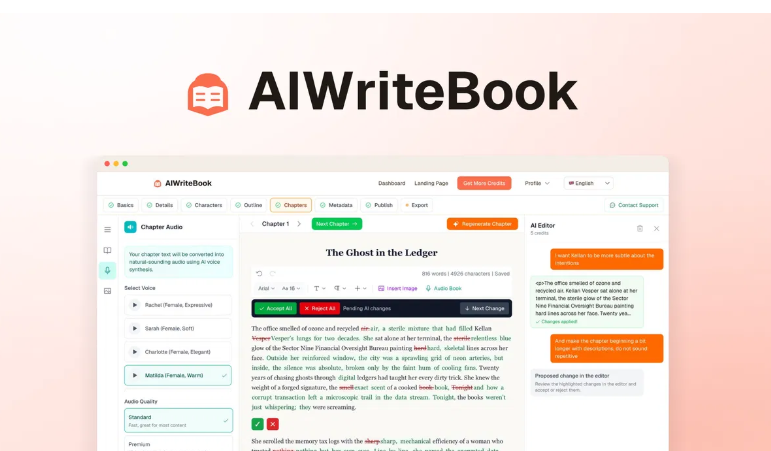
Instead of regenerating an entire 2,500-word chapter when a single paragraph misses the mark, you highlight the problematic section and use the built-in AI Chat assistant. AIWriteBook returns an editorial preview showing insertions in green and deletions in red, allowing you to accept or reject granular changes without burning credits on full-chapter rerolls.
6. Cover Design and Print Interior Formatting
AIWriteBook generates complete book packages:
- Cover Designer: Renders front covers and full-wrap covers matched to your book’s page count and spine thickness.
- Interior Formatter: Exports print-ready PDF/X-1a files across industry-standard trim sizes (5×8, 5.5×8.5, 6×9 inches) with mirrored margins, gutter compensation, running headers, and page numbers.
- Digital Outputs: Produces validated EPUB and structured DOCX files compatible with Amazon KDP, IngramSpark, Apple Books, and Kobo.
How the Credit Economy Works
Because AI models and image generators incur server costs, AIWriteBook operates on a monthly credit allocation. Understanding the arithmetic is essential before choosing a tier:
- Outline Generation: 3 credits per chapter.
- Drafting a Chapter: 15 credits (Gemini), 20 credits (Grok), or 30 credits (Claude).
- Inline AI Chat Edit: 5 credits per targeted paragraph edit.
- Book Cover Variant: 30 credits per image. (Note: The cover generator defaults to 3 variants at 90 credits; set it to 1 while experimenting to conserve credits).
- In-Chapter Illustration: 15 to 20 credits per render.
- Book Formatting Pass: 200 credits one-time per finalized title.
On an average 12-chapter, 30,000-word book written with Gemini, complete with outline, light chat revisions, and a cover, you will consume roughly 250 to 300 credits.
Pricing and AppSumo Lifetime Tiers
AIWriteBook is available on AppSumo as a tiered lifetime deal. Each tier grants permanent access with a recurring monthly credit pool that resets every month:
| Tier | One-Time Price | Monthly Credits | Key Features & Limits |
| License Tier 1 | $79 | 500 / month | Core writing workspace, style builder, KDP export, 30+ languages, standard covers. |
| License Tier 2 | $159 | 1,000 / month | All Tier 1 features + Audiobook Studio (AI voice narration), Author Page, and NSFW book support. |
| License Tier 3 | $319 | 2,500 / month | All Tier 2 features + Book Series support, Visual Books (children’s/comics), Translation, and BYOK (OpenRouter API). |
| License Tier 4 | $519 | 5,000 / month | All Tier 3 features + Distribution via the NanoReads publishing platform. |
Crucial BYOK Detail for Tier 3 & Tier 4: By connecting your own OpenRouter API key, every generation action drops to a flat 1 credit against your AIWriteBook balance. You then pay OpenRouter directly for raw tokens at cost, effectively bypassing monthly credit bottlenecks for heavy publishing schedules.
All tiers include AppSumo’s standard 60-day money-back guarantee.
Honest Pros and Cons
The Pros
- Complete Workflow Consolidation: Replaces 3 to 4 separate software subscriptions for drafting, cover generation, and formatting.
- Style Preservation: Learns personal writing tone reliably through sample uploads, significantly cutting down on generic AI phrasing.
- Print-Engine Precision: Generates genuine KDP-compliant interior layouts with gutters and embedded fonts, eliminating manual formatting headaches.
- Flexible Multi-Model Access: Seamlessly toggle between Gemini for speed, Grok for uncensored fiction, and Claude for literary polish.
- OpenRouter BYOK Leverage: Tiers 3 and 4 offer an affordable path for power authors by dropping internal credit costs to 1 credit per generation.
- Active Founder Development: Founders Mykyta and Artem actively push weekly roadmap updates and answer AppSumo support queries directly.
The Cons
- Credit Burning on Visual Books: Illustrated books and coloring books consume credits rapidly (15 to 20 credits per single page render), making Tier 1 and 2 insufficient for heavily illustrated projects.
- Cover Typography Limitations: AI-rendered covers generate text as flat pixels rather than vector type layers, which can cause occasional spelling errors that require manual Canva or Photoshop adjustments.
- Mandatory Fact-Checking for Nonfiction: While reference files improve accuracy, the AI can still hallucinate technical arguments if inputs are sparse.
- Feature Gating: Book series continuity, translation, and BYOK are locked behind Tier 3 ($319) and above.
Who Should Use AIWriteBook?
- Niche Site Owners and Bloggers: If you want to turn top-performing blog content into professional PDF or Kindle lead magnets, AIWriteBook automates the layout, cover, and packaging.
- Bootstrapping Fiction Authors: Indie novelists who need structured assistance generating outlines, tracking complex character arcs, and drafting initial prose in their own tone.
- Freelance Ghostwriters: Service providers who create foundational drafts, outlines, and client-ready chapter structures under tight turnaround windows.
Who Should Avoid It?
- Zero-Touch “One-Click” Book Creators: If you expect a software tool to create a bestselling, factually flawless book with a single button press and zero human editing, you will be disappointed.
- Heavy Graphic Novel and Comic Creators on Low Tiers: If your books require hundreds of full-color illustrations, standalone image tools like Midjourney paired with InDesign will yield better visual control without burning software credits.
User Interface and Ease of Use
AIWriteBook structures the book creation journey into a linear, horizontal step-bar:
- Basics: Define title, genre, target demographic, and tone.
- Details: Upload sample prose to train your voice and attach nonfiction reference documents.
- Characters & Outline: Generate or refine character dossiers and chapter-by-chapter story beats.
- Chapters: Draft chapter prose, select specific AI models, and execute inline chat edits.
- Cover & Illustrations: Render themed cover variations and page art.
- Export & Publish: Compile validated print PDFs, EPUBs, or DOCX files and generate KDP metadata tags.
This step-by-step layout prevents beginners from getting overwhelmed by complex configuration menus.
Performance, Integrations, and Support
- Integrations: Direct export compatibility with Amazon KDP specifications, Apple Books, Kobo, and IngramSpark. Tiers 3 and 4 integrate with OpenRouter for custom API key routing.
- Language Support: Generates and formats manuscripts natively in over 30 languages.
- Customer Support: In-app support chat, an active public roadmap board where users vote on weekly feature updates, and direct founder engagement on AppSumo.
- Data Security: User manuscripts are hosted on secure Postgres databases in the EU (Ireland). User data is not used to train third-party foundation models.
AIWriteBook vs. The Competition
1. AIWriteBook vs. Novelcrafter
Novelcrafter is a favorite among tech-savvy indie authors. It operates primarily on a BYOK (Bring Your Own Key) model with an intricate “Codex” for worldbuilding. However, Novelcrafter does not handle cover design, interior print PDF formatting, or automated KDP packaging. AIWriteBook provides a simpler, more comprehensive end-to-end publishing pipeline.
2. AIWriteBook vs. Scrivener
Scrivener remains the gold standard for manual long-form manuscript organization and compile customization. However, Scrivener offers zero native generative AI capabilities, no voice matching, and has a notoriously steep learning curve. AIWriteBook is significantly faster for creators who want AI-assisted generation combined with automated layout tools.
3. AIWriteBook vs. Inkfluence AI
Inkfluence AI is another AppSumo contender in the book space. While Inkfluence offers robust audiobook generation and server-side drafting, AIWriteBook provides deeper control over character continuity, multi-model selection (including Claude and Grok), and targeted inline editing.
Head-to-Head Comparison Table
| Feature | AIWriteBook | Novelcrafter | Scrivener |
| Primary Focus | End-to-end writing & publishing | Advanced AI-assisted drafting | Traditional writing & compiling |
| Pricing Model | Lifetime deal (from $79) | Monthly subscription + API | One-time desktop license (~$59) |
| Voice Style Training | Yes (upload writing samples) | Prompt-based styling | No |
| Built-in Cover Designer | Yes | No | No |
| KDP Print Interior Engine | Yes (mirrored gutters, PDF/X) | No | Yes (requires complex setup) |
| Multi-Model Support | Gemini, Claude, Grok, OpenRouter | Broad API model routing | None |
| Ease of Use for Beginners | High (guided horizontal flow) | Moderate (steeper learning curve) | Low (complex compile engine) |
Honest Verdict: Is AIWriteBook Worth Buying?
Yes, AIWriteBook is worth buying—provided you treat it as an author’s assistant rather than an autonomous replacement for human creativity.
If your goal is to publish structured nonfiction guides, romance novellas, lead magnets, or fantasy books faster, AIWriteBook solves the single biggest headache in indie publishing: tool fragmentation. The ability to draft in your own voice, design a matching cover, and export a pre-formatted, gutter-compensated PDF directly for Amazon KDP inside one platform saves dozens of hours of frustrating technical setup.
For casual authors producing 1 to 2 books per year, Tier 1 (
159) provides excellent value. For prolific publishers, agencies, or series writers, Tier 3 ($319) is the clear sweet spot due to its generous 2,500 monthly credits and the ability to hook up OpenRouter for unlimited, low-cost drafting.
Backed by AppSumo’s 60-day money-back guarantee, you can road-test your first complete book manuscript completely risk-free.
👉 [Get Lifetime Access to AIWriteBook on AppSumo via [Enter Your Affiliate Link]]
Frequently Asked Questions (FAQ)
Does AIWriteBook write the whole book automatically?
AIWriteBook generates complete outlines and full chapter drafts, but it is not intended to be a hands-off, single-click tool. You guide the process by setting the tone, refining character parameters, reviewing generated chapters, and using the inline AI chat editor to polish the text.
Can I publish books created with AIWriteBook directly to Amazon KDP?
Yes. AIWriteBook exports fully validated print-ready interior PDFs (with industry-standard trim sizes, mirrored margins, and gutter formatting), Kindle-compatible EPUBs, and formatted DOCX files. It also includes a metadata tool to help select KDP categories and keywords.
What happens when I run out of monthly credits?
Your credit allowance automatically renews each month on the date you activated your license. If you are on Tier 3 or Tier 4, you can connect an OpenRouter API key to continue writing for a nominal token cost (1 credit per action) even after your base monthly allowance is consumed.
Do I own the copyright and rights to the books I create?
Yes. You retain 100% commercial ownership and intellectual property rights over all manuscripts, outlines, and cover graphics created through your account.